Deploy on AWS
This deploys a CloudFormation stack that creates CE roles in your AWS account. Takes about 5 minutes.
Prerequisites
- AWS account with permissions to create IAM roles (AdministratorAccess or PowerUserAccess)
- Your security team's email address for CE-Admin alerts
Option A - AWS Console
1. Sign in to the AWS Console in the account you want to grant access to.
2. Go to CloudFormation and click Create stack > With new resources.
3. Click Deploy via CloudFormation — this opens CloudFormation with the template and stack name pre-filled. You only need to enter your AdminAlertEmail and acknowledge IAM resources.
Your CE engagement manager will send you a link with these already filled in, and can adjust the region if needed.
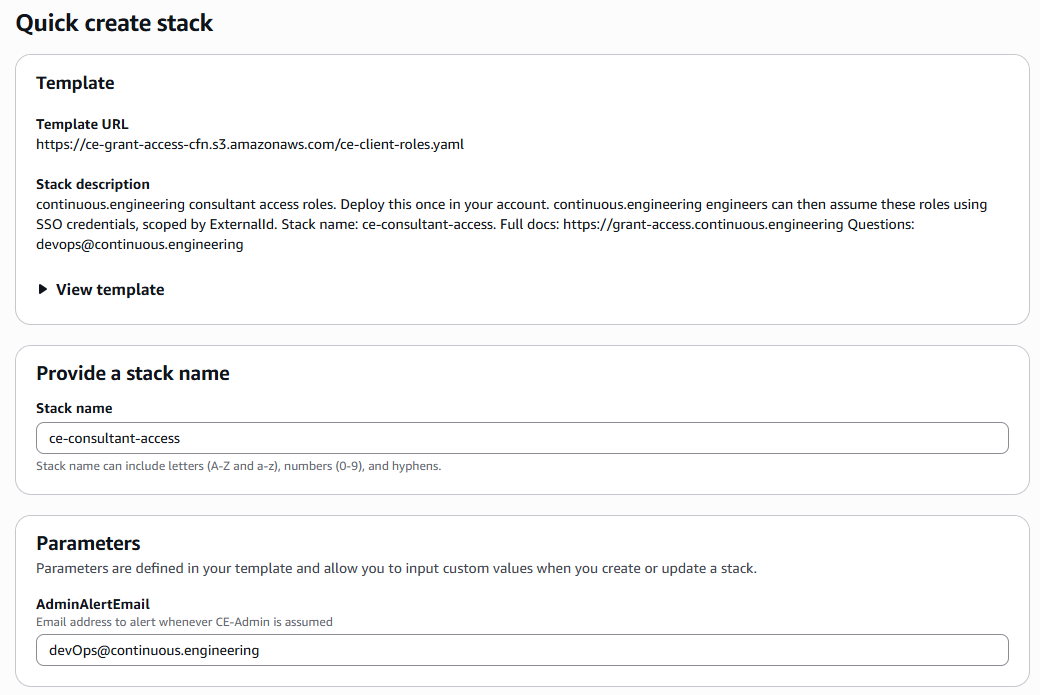
4. Fill in the parameters:
| Parameter | Value |
|---|---|
| Stack name | ContinuousEngineering-Operations-Access |
| AdminAlertEmail | Your security team's email address |
5. Click through the options and on the final page check I acknowledge that AWS CloudFormation might create IAM resources with custom names.
6. Click Submit and wait for CREATE_COMPLETE.
7. Share your AWS Account ID with continuous.engineering to complete the two-way trust.
Option B - AWS CLI
aws cloudformation deploy \
  --template-url "https://ce-grant-access-cfn.s3.amazonaws.com/ce-client-roles.yaml" \
  --stack-name ContinuousEngineering-Operations-Access \
  --capabilities CAPABILITY_NAMED_IAM \
  --parameter-overrides \
    AdminAlertEmail=security@your-company.com
Then share your AWS Account ID with us.
What gets created
| Resource | Type | Purpose |
|---|---|---|
| CE-ReadOnly | IAM Role | Read-only across all services |
| CE-Security | IAM Role | CloudTrail, GuardDuty, Config read |
| CE-SRE | IAM Role | Read + restart services + SSM shell |
| CE-DevOps | IAM Role | Infrastructure management, no IAM |
| CE-Data | IAM Role | RDS/S3/Athena read + SSM on tagged instances |
| CE-Admin | IAM Role | Full admin, 2h session, alert on every assumption |
| CE-Billing | IAM Role | Billing/Cost Explorer read-only |
| CE-Support | IAM Role | AWS Support case access |
| CE-DenyProd | IAM Managed Policy | Attach to any role to block prod resources |
| ce-admin-alert | SNS Topic | Emails your team when CE-Admin is assumed |
| ce-admin-assumed | EventBridge Rule | Triggers the SNS alert |
| continuous.engineering-access | CloudWatch Log Group | All CE activity, 365-day retention |
| ce-activity-to-logs | EventBridge Rule | Routes CE role events to the log group |
| continuous-engineering-access | CloudWatch Dashboard | 17-widget live dashboard of all CE activity |
| ce-admin-assumed (alarm) | CloudWatch Alarm | Fires on CE-Admin assumption |
| ce-access-denied-spike (alarm) | CloudWatch Alarm | Fires on unusual denied calls |
After deployment, find your dashboard URL in the stack outputs or see the monitoring guide.
aws cloudformation describe-stacks \
  --stack-name ContinuousEngineering-Operations-Access \
  --query "Stacks[0].Outputs[?OutputKey=='DashboardURL'].OutputValue" \
  --output text
Restricting production access
Tag your production EC2 instances:
Key:   env-prod
Value: true
Then attach CE-DenyProd to whichever roles you want blocked from prod:
# Get the policy ARN from your stack outputs
POLICY_ARN=$(aws cloudformation describe-stacks \
  --stack-name ContinuousEngineering-Operations-Access \
  --query "Stacks[0].Outputs[?OutputKey=='CEDenyProdPolicyArn'].OutputValue" \
  --output text)

aws iam attach-role-policy --role-name CE-SRE --policy-arn $POLICY_ARN
aws iam attach-role-policy --role-name CE-DevOps --policy-arn $POLICY_ARN
The deny overrides everything. Even AdministratorAccess cannot reach a resource tagged env-prod=true once CE-DenyProd is attached.
Scoping database instance access
CE-Data only allows SSM shell access to instances you explicitly tag:
Key:   database
Value: true
Instances without this tag are inaccessible via CE-Data, regardless of what else runs on them.
Removing access
aws cloudformation delete-stack --stack-name ContinuousEngineering-Operations-AccessOr in the console: CloudFormation > ContinuousEngineering-Operations-Access > Delete.
All CE roles are removed immediately. Active tokens expire within their remaining lifetime (max 4 hours).
Questions
Full role-by-role details, including what each managed policy actually grants, live on the Roles Reference. Most "can this role do X" and "why is Y blocked" questions are answered there or in the FAQ.
If something still isn't clear (a permission you expected to see isn't there, an assumption fails, or you just want a second pair of eyes on the stack before deploying to a production account), reach out to devops@continuous.engineering before making changes on your own. We'd rather answer a question up front than have you work around something that was intentional.